Cornell Notes Templates: The Ultimate Guide for 2026
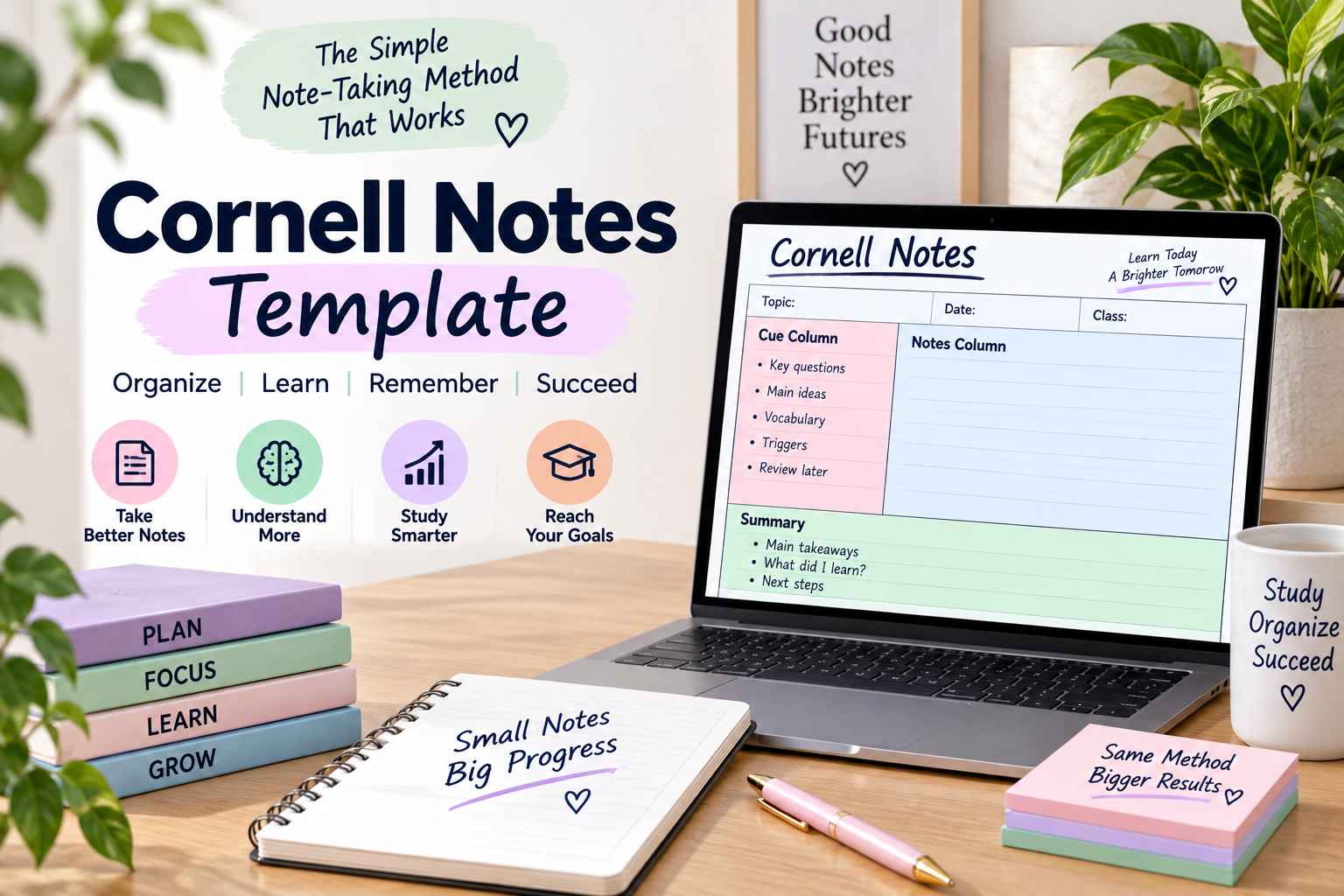
Updated for 2026
Imagine a student who can’t remember over half a lecture after one day of hearing it. You’re not being forgetful, you’re simply experiencing what people go through when they take notes the old-fashioned way, in one long uninterrupted column with no memory devices to help with recalling information later on. That’s why Cornell Notes templates were developed, and they are still one of the most widely used systems for note-taking in American classrooms even today.
You will discover the actual and exact dimensions of the original method on how to create a Cornell Notes template Google Docs version and a Cornell notes template Microsoft Word version from the ground up, and the real research behind whether or not the original method is effective, and how to modify it for use in the math classroom, history classroom, science lab, or even office meetings. It is intended to be the most comprehensive resource on the subject so you can bookmark and revisit at any time you need to refresh your knowledge on the subject.
Key Takeaways
- The Cornell Notes template consists of three working areas, a narrow column for “cues”, a wide column for “notes”, and a summary section at the bottom of the page.
- This is a standard letter size page with a 2.5″ wide for “cue” column and a 6″ wide for “notes” column.
- Creating a Cornell notes template Google Docs version only takes about 5 minutes and requires no downloads.
- A Cornell notes template Microsoft Word version can be utilized as a reusable template which you never need to recreate.
- There is actual evidence that taking notes using the Cornell method is superior to taking notes in plain sentence style; however, this benefit is closely linked to the frequency with which a student reviews his/her notes.
What is a Cornell notes template?
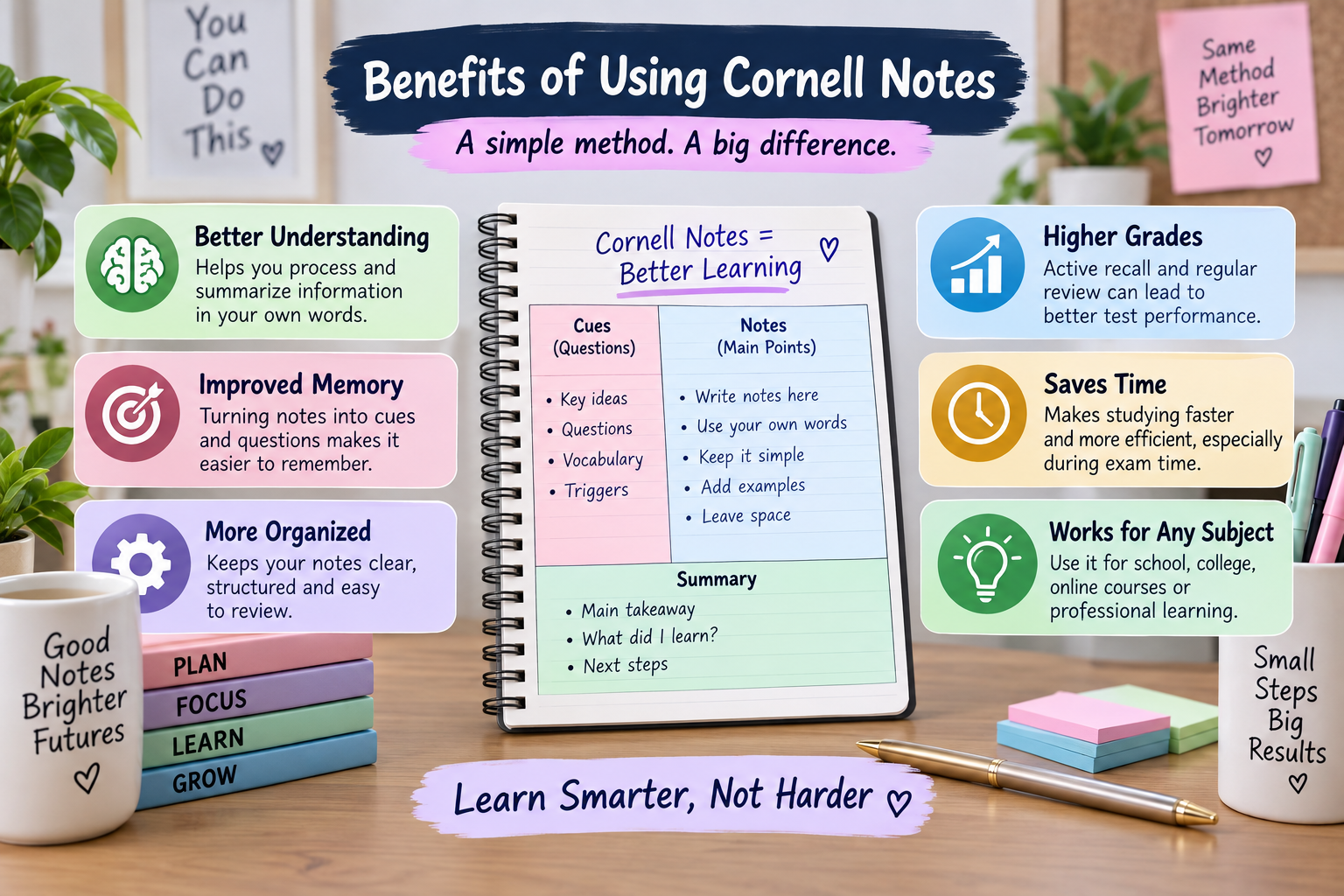
A Cornell Notes template is a layout that divides a single sheet of paper into three sections, a column for cues with keywords and questions, a column for taking notes during class, and a strip at the bottom for a concise summary that is written later. The template makes a page of raw notes into a built-in study tool instead of a flat transcript that needs to be reorganized later.
It was developed in the 1950s by professor Walter Pauk at Cornell University and featured in his book How to Study in College. Even today, the method is taught at Cornell and its official study guide, Cornell Notes, is one of the clearest primary sources, with an interactive course that takes you through the method, step by step.
Why is it called The Cornell Method?
The Cornell method is named after Cornell University where it was developed and taught as part of the study skills program in the university. Cornell’s alumni magazine says the university’s Learning Strategies Center continues to create teaching content for the system, and hundreds of thousands of students all over the world have taken the university’s course that went online.
Will the Cornell Notes Template Be Relevant in 2026?
Yes, the Cornell Notes format is still being taught in 2026, and is still one of the types of notes required in the AVID college readiness program in many American middle and high schools. Built-in Cornell layouts are now part of the digital note taking apps that ship with your computer, including Good-notes, Notion, and One-note, so it’s not a format that’s outdated.
You can’t remember anything else from this section other than the two-six-two rule. The cue column is approximately 2 to 2 ½ units wide, the note column is approximately 6 units wide, and the notes summary strip is approximately 2 units tall. That ratio is more important than the actual number of inches, because the column for notes is double the width of the cues column and will keep the cues column narrow enough to create a cue that is less than a paragraph.
Real Dimensions Behind Cornell Notes Template
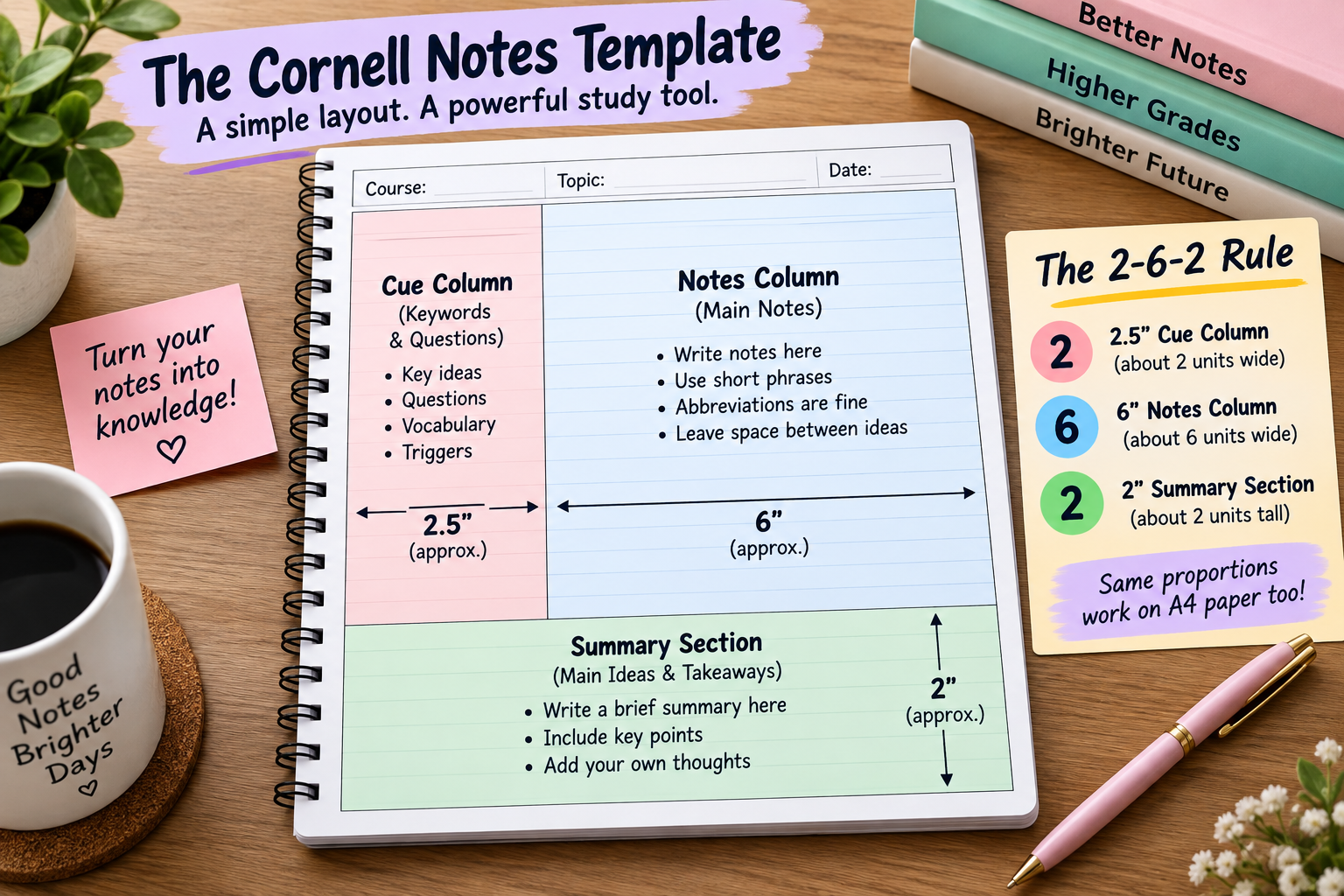
The vast majority of Cornell Notes templates you can find online will vary slightly from one another, leading to a large number of untidy “homemade” templates. The following proportions are used for a letter sized page, according to a note taking resource from the University of Cincinnati’s Learning Commons.
| Section | Width | What Goes Here |
| Header | Full width, about 1 inch | Course Name, Topic, Date |
| Cue Column | A 2.5″ x 9″ piece of paper. | After class keywords, questions, prompts |
| Notes Column | 6 inches wide, 9 inches tall | Main points taken during the lecture |
| Summary | About 2 inches wide and high. | A brief summary that is written the same day. |
Is the Cornell Notes Template an A4 size paper?
Yes, you can use a Cornell Notes template on an A4 size paper, as long as you use the same proportions and not the same inches used in the United States. The notes column can be approximately twice as wide as the cue column and the summary portion can be approximately 1/5 of the total page height and the template will operate as it does in a standard American letter size page.
Building A Cornell Notes Template Google Docs Version
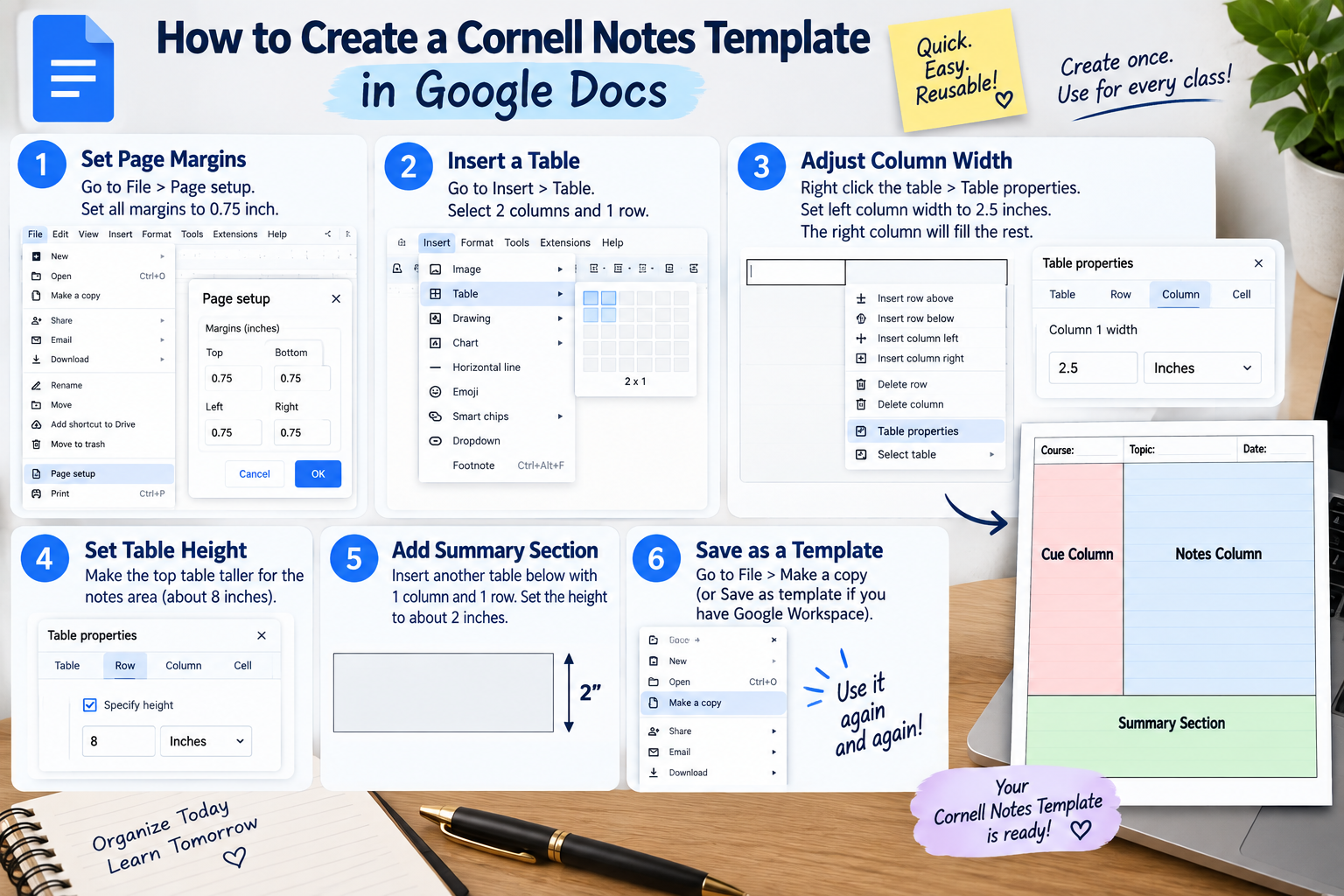
Although it doesn’t have a pre-designed template for Cornell Notes, you can create one in Google Docs within a couple of minutes, and then save it so you don’t need to rework it in the future.
The process for creating a Cornell notes template Google Docs layout is:
- Create a new Google Doc and select File, then Page Setup, and make all margins 0.75 inch to ensure that you have the full working width of the page.
- Enter the header line for the course name and topic and add the date at the top, and bold it so that it becomes prominent on every page.
- Right click and open Table Properties, set the width of the left column to 2.5 inches and the rest will fill the remainder of the page automatically.
- Then make the table span the entire width of the page by dragging the bottom border of the table or setting a minimum table row height, so that the table does not appear as a short strip at the top of the document.
- Under that table, put another table that has one row and one column, approximately 2 inches high, for the summary section.
- Save time in the future by setting up a new Master Copy of your file before each new class by selecting File, then Save As Template if you are using a Google Workspace account, or by creating a blank Master Copy and then selecting File, then Make A Copy for each new class.
If you take notes during class on your laptop or Chromebook and want your notes to automatically save and be searchable later, you will need a Cornell notes template Google Docs setup. The down side is that if you’re going to print blank pages in bulk, its table borders don’t print as clearly as a Word file.
How To Create A Cornell Notes Taking Template Microsoft Word Version
This is more straightforward in Microsoft Word, as you can secure exact measurements and save the whole thing as a reusable file, rather than duplicating the document each time.
To create a Cornell note taking template Word file, there are four steps:
- Create a new Word document, click on Layout, Margins, Custom Margins and change all margins to 0.75 inches.
- Click on Insert, Table, and then Insert Table, two columns, one row.
- Select Table Layout in the left column, and adjust the width of the first column to be just 2.5 inches, with the rest of the area expanding automatically to the right.
- Right click the table, select Table Properties, then Row, and set a fixed row height of approximately 8 inches, to take up most of the printable page.
- Underneath it add a second table with one column and one row; about 2 inches tall; for the summary section.
- Create a header text above both tables, then go to File, then Save As, then Word Template instead of Document.
- Each time you open that saved Cornell notes template Word file, a brand new, unaltered copy is made automatically, and you will never be forced to delete last week’s notes prior to beginning a new page.
If you hand out your notes that are printed then the better option is to save them as a Word document file because you will be able to have tighter margins for your print job than what Google docs offers, particularly if you are creating a template of Cornell Notes taking Microsoft Word file for an entire class to print and distribute.
Cornell Method/Notes Notebook, Which notebook should you buy
A Cornell method notebook is a notebook that is already pre-printed with the listed sections of the notebook, the cue column, the notes column and the summary lines so you never have to make them yourself. The primary reason that students stop using this system is not because of the review itself, it’s because they stop using it day after day because they don’t know what the columns will look like. A pre-made Cornell notes notebook eliminates that obstacle entirely.
| Format | Best For | Main Limitation |
| Cornell Method Notebook | Handwriting enthusiasts who wish to have the layout done for them on each page | The dimensions that cannot be changed for a particular subject. |
| Printable PDF Template | Teachers making handouts or testing out the format before purchasing a notebook | Requires a printer and cannot be edited after printing. |
| Cornell Notes Template Google Docs | The ability to type on a laptop, to back up to the cloud, and to easily share with classmates. | Table formatting may vary slightly from page to page. |
| Cornell Notes Template Word File | A secure, re-usable digital format for mass printing. | Needs to use Microsoft Word (a specific application) |
| Take notes on apps like GoodNotes or OneNote | Handwriting on a tablet or later adding a search feature. | May require a fee and typing may be slower than a good lecture |
A Cornell Notes Notebook vs A Regular Notebook – Is It Worth the Purchase?
Yes, if your students are the ones that don’t continue using the hand drawn model and forget to hand in their notes, a pre printed Cornell method notebook will be worth the money because if you use it every day, it can certainly help, but if you don’t use it then you don’t use it…
How The Template works: The Five Step Review Process
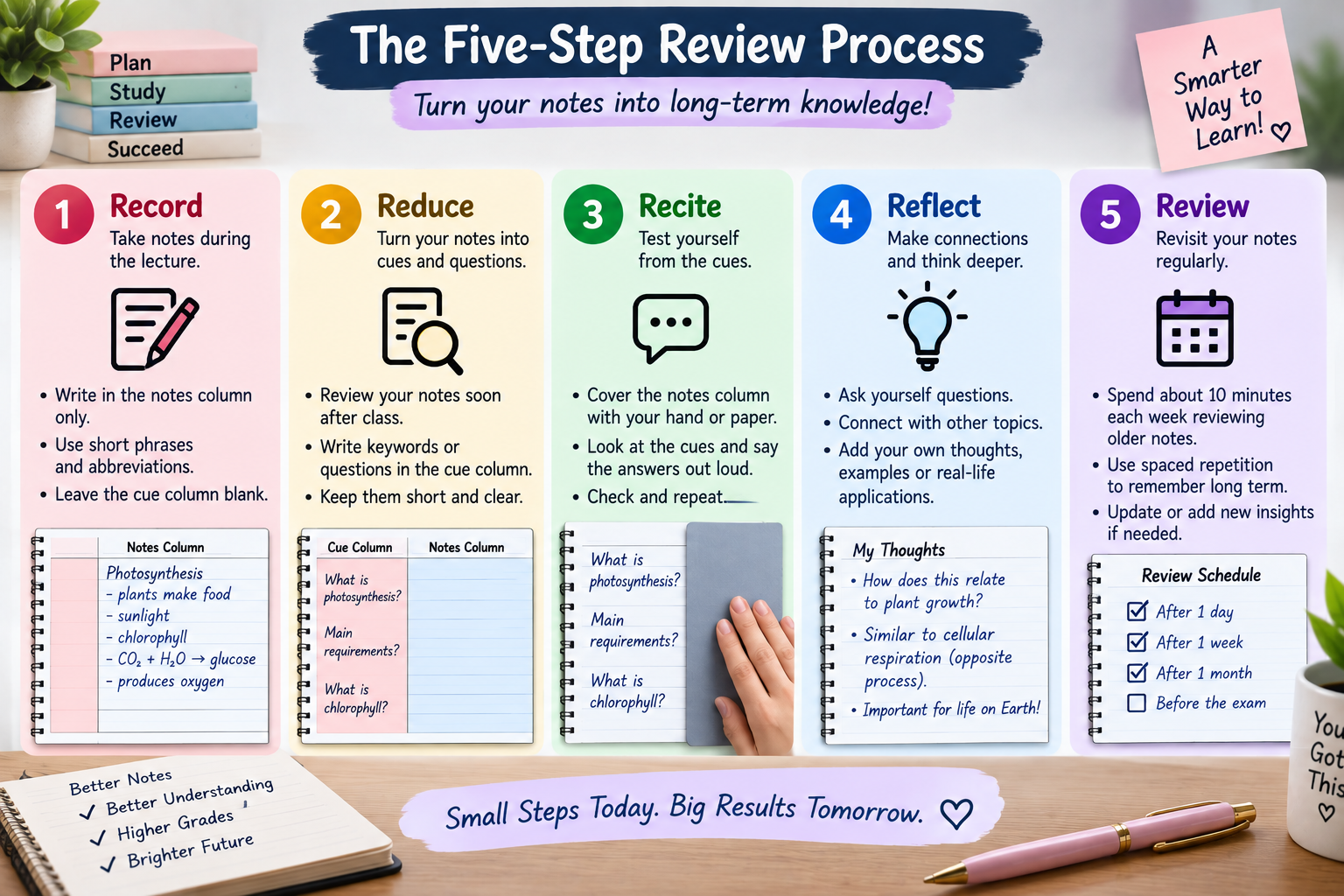
Once the layout is in place you’re just half way done. Pauk’s original method is based on five steps and he has coined the term the “five R method” to be able to use them as reference when talking to students who feel the format never helped them.
The five steps of the Cornell Notes method are:
- Record, Only record (write) in the notes column during the lecture in short phrases and abbreviations, the cue column is left empty during class.
- Reduce, read through your notes again as soon as possible after class and turn each chunk into a Cue (a keyword or question) in the Cue column — this is the part most students don’t do, and is the one that makes the whole system work.
- Recite, cover the notes column with your hand or piece of paper, only look at the cues and say the answer out loud from memory and then compare your answer with the answer.
- Reflect, make observations, ask questions, make a connection with other content in the margins, making the page more of a real understanding than a transcript.
- Review, spend approximately ten minutes a week re-reading the older pages and asking yourself questions in the cue column, as information sticks with spaced repeated review, not one long session before a test.
Does the use of Reviewing Cornell Notes Actually Improve Test Scores?
A 2025 randomised controlled trial that included a five week note taking intervention examined 134 students in four different note taking styles: Cornell notes, sentence style notes, parallel notes, and digital notes. The outcome was specific and not general. Students in the Cornell notes condition outperformed students in the plain sentence notes condition on the retention test and learning motivation.
Here it is important to be upfront with people, even though it may appear to be exaggerated. According to a summary of the academic literature on the Cornell system available on Wikipedia, there are several studies that support the benefits of the Cornell system, but there are also various theories that question the overall effect of the Cornell system on learner retention. The format provides you a framework to develop study habits, but it is not a habit of reviewing.
Examples By Subject – Cornell Notes
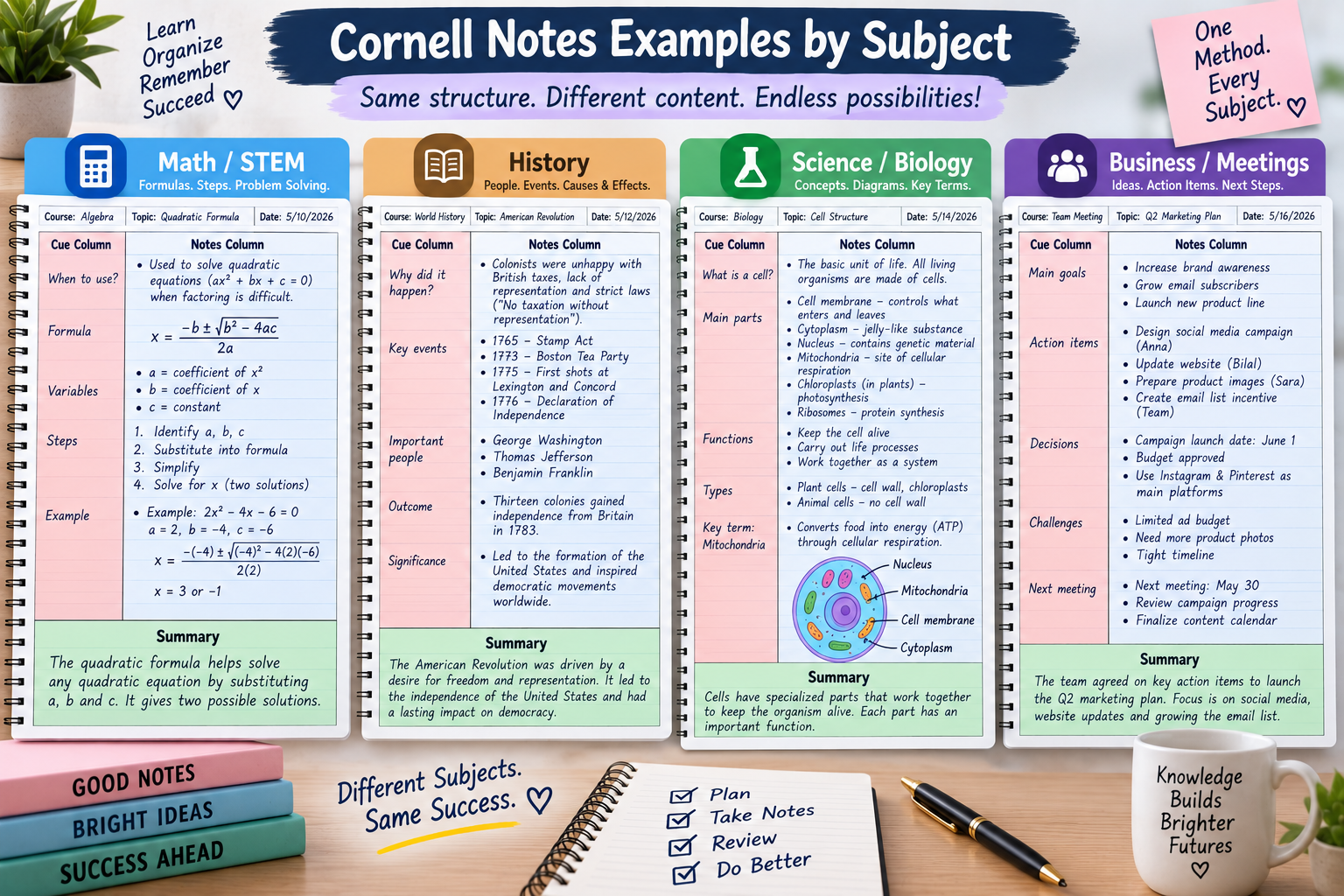
The structure remains the same in all subjects, but the words you put in the cue column will vary by subject.
- Mathematics and science (formulas). For the type of problem write in the cue column but not the formula, for example, “when do you use the quadratic formula” and leave the notes column for fully worked examples showing each step with a label.
- History and literature. It is best to provide cues that are who, what and why prompts with a specific date or event, and the notes column should clearly show the cause and effect chains (these are usually essay questions for these subjects that look for connections rather than just facts).
- Lab sciences. Use half of the notes column for a labelled diagram or process flow, and use the cue column for words; vocabulary is a big part of science exams!
- Business meetings. Replace words in cues column with action items and don’t worry about an academic recap in the summary section since it would easily be just a set of meeting notes as notes taken in a lecture hall at Cornell.
If you’re still considering whether Cornell Notes is the system for you, here’s how it differs from the other styles that are taught with it.
| Method | Structure | Best For | Weak Point |
| Cornell | Cue column, notes column, and summary. | Lecture based classes and exam review. | More time consuming to set up than plain notes |
| Outline | Nested bullet hierarchy | Well structured, sequential lectures | Breaks apart when the speaker jumps about |
| Mapping | A web of ideas that are interconnected in a visual way. | Topics that have many interrelated ideas | Can be difficult to draw rapidly in real time |
| Charting | Comparing categories in rows and columns | Content that can be compared using dates or causes | Only works if the content is tabular. |
| Sentence | A list of sentences with numbers. | Lectures that are too fast and don’t allow enough time to organize. | Does not have any built-in review structure |
The Fatal Silence of Errors in a Cornell Notes Template
- Filling in the cue column as it happens. This is the one most frequent error. The cue column is one step after class and it distracts you from focusing during the lecture.
- If time is running short, omitting the summary. Even a one-sentence synopsis is better than nothing, as it is most strongly associated with actual retention in the above research.
- Using full sentences in the notes column. Full sentences slow you down in the real world and you won’t have time to add cues afterwards anyway, so the narrow column becomes a complete waste.
- Failure to go back and read the pages afterwards. If you never open the Cornell Notes template, then it has no value whatsoever, it only works if you do the 10 minute weekly review.
Quick Summary
- Cornell Notes templates divide the page into a two-six-two rule of 2.5 inches, 6 inches and 2 inches, as stipulated by this guide.
- In about 5 minutes, you can create a template of a Cornell notes Google Docs version using two nested tables.
- The Cornell notes template Microsoft Word version can be saved as a template to be used repeatedly without having to recreate the format.
- The most common obstacle which stopped the students from using the Cornell method notebook is filling in the columns by hand, which is eliminated in a pre-printed Cornell method notebook or Cornell notes notebook.
- The template is only effective when using the five step review process, particularly the reduce and review steps – these are steps where the actual retention benefit occurs, based on peer reviewed research.
FAQ
Which of the following is the appropriate length of the “cue” column for a Cornell Notes template?
The “cue” column is 2.5″ wide on a standard letter size page, and extends from the top to the bottom of the notes column (which is approximately 9″). The ratio is roughly the same, 2:5, between the cue column and the notes column on A4 paper.
Is there a template for Cornell notes in Google Docs?
There is no pre-existing Cornell notes template in Google Docs, but you can create a Cornell notes template Google Doc in less than 5 minutes using a table with 2 columns; one column should be 2.5 inches wide and the other should be 1 inch wide and then adding another table below for the summary.
Does Microsoft Word have a Cornell Note Taking Template?
Not necessarily, but Microsoft Word can store a custom layout as a template file, and that makes it a better choice out of the two options. If you’re going to use a Cornell notes template Word file often, it permanently locks your exact measurements.
What is the difference between a Cornell method notebook and a regular notebook with lines added on?
Functionally, it makes no difference, except that a Cornell method notebook comes with the column headings, notes column and the summary section already drawn out on each page, rather than having to do it yourself for every class.
Does the Cornell method work?
Controlled research has demonstrated a real retention advantage for Cornell Notes when compared to unstructured sentence style notes (and the level of motivation is the strongest factor that has been correlated with retention, aside from how consistently the review steps are followed), so it is a real effect, but not a guarantee independent of the extent to which the review steps are followed.
Are Cornell Notes Templates available for use outside of school?
Yes, there are many professionals who utilise a Cornell notes template for meetings, and they only fill in the action column with their action items, and they don’t bother with the summary column as an academic summary, but rather use it for decisions and next steps.



Post Comment