Normal Sleep Cycle Graph on Apple Watch Explained
Here is what a normal sleep cycle graph on Apple Watch looks like, and how to read yours with confidence.
You wake up and open the Health app and there it is, a strip of coloured bars jumping up and down like a city skyline. Some are orange, some are light blue, some are dark blue and a few little red marks indicate that you were awake. Is it a good night? A bad one? Most of us simply glance at the total hours and shut off the app.
This article explains the normal sleep cycle graph that Apple Watch displays, bar by bar. You will be able to find out what each colour represents, how much of each stage is normal, what a healthy pattern should look like from bedtime to alarm and what to look for over the next few weeks. No medical degree required.
Key Takeaways
- There are typically 4 to 5 sleep cycles in a healthy night, and each sleep cycle is about 90 minutes.
- On Apple Watch, deep sleep is more likely to occur early in the night, and REM is more likely to be longer towards the morning.
- The majority of the graph is occupied by core sleep. Approximately two thirds of the night is normal.
- Short awake marks between cycles are normal. Very few people ever remember them.
- One odd night doesn’t make a big difference. Don’t worry until you check the weekly and monthly chart.
- Your watch provides a good estimate, not a lab result. Use it to identify patterns, not to diagnose yourself.
1. What the Apple Watch Sleep Graph Shows
Before we read a normal sleep cycle graph on Apple Watch, it helps to know what the chart is tracking. If you wear your watch to bed with Track Sleep on, it monitors three things during the night: wrist activity, heart rate and breathing. From those signals it guesses what stage of sleep you’re in, minute by minute.
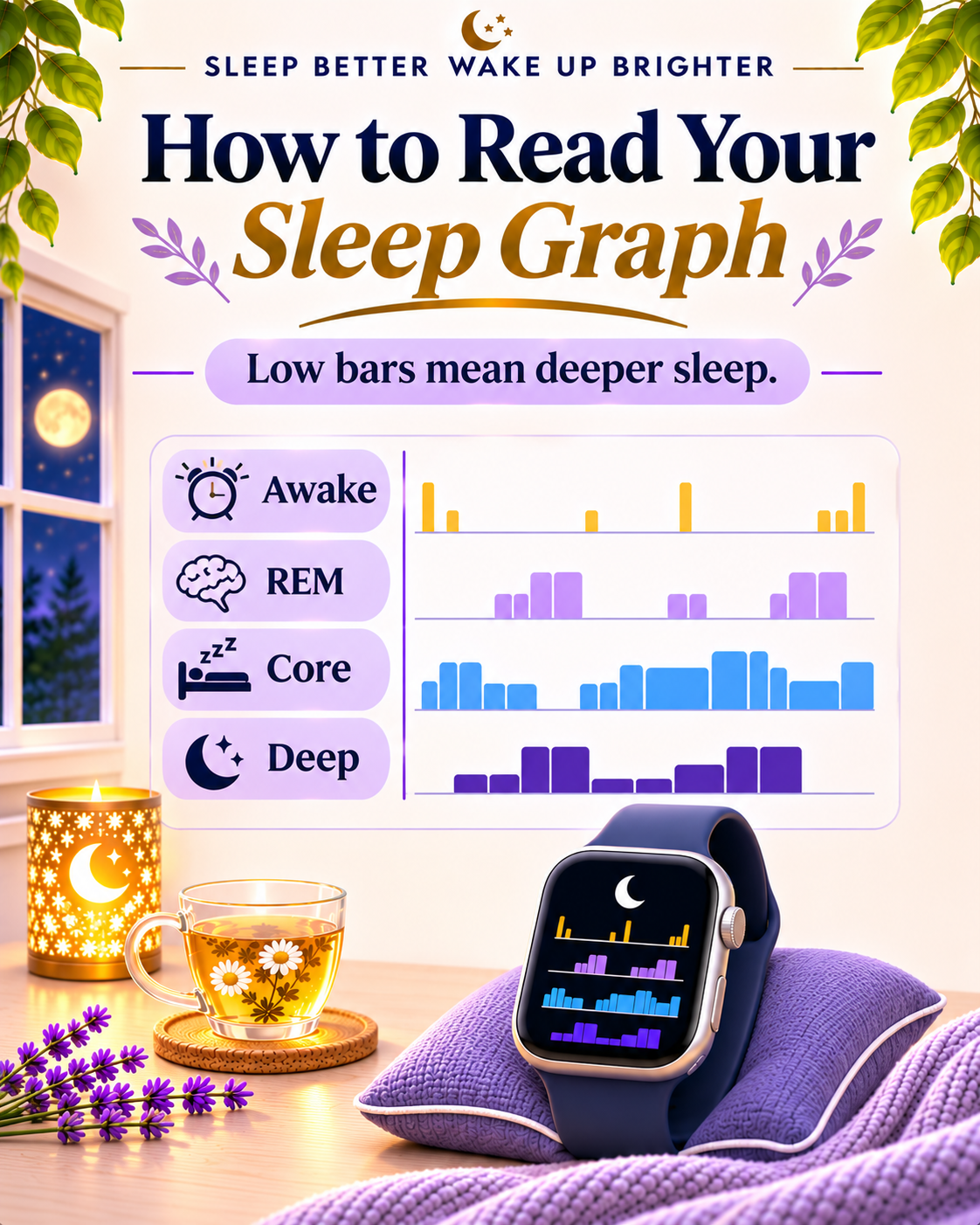
The Health app on your iPhone converts that guess into a chart in the morning. Time flows from left to right. Awake is at the top, then REM, then Core, and Deep at the bottom. So if the bar is low on the chart, you were sleeping heavily. If it jumps up, you were in a lighter stage or woke up for a short period of time.
This type of chart is called a hypnogram in sleep labs.
To view it, go to the Health app, select Browse, and then Sleep. The chart will display the daily view. Tap W, M or 6M at the top to view a week, a month or six months. Tap Show More Sleep Data to view the amount of time and the percentage you spent in each sleep stage. On the watch, launch the Sleep app and rotate the Digital Crown to view the previous 2 weeks. Apple explains each step in its guide to tracking your sleep on Apple Watch.
One small thing that trips people up: you have to wear the watch for at least an hour of sleep, and Apple recommends that you charge it to at least 30 percent before bed. If the battery dies at 3am, the graph simply stops.
2. The Four Stages of Sleep in Plain Words
Sleep is not a uniform state. Your brain goes up and down several steps on a staircase every night.
Stage 1 and Stage 2: Light sleep (Core on Apple Watch)
The doorway is Stage 1. It only takes a few minutes. Your muscles relax, your breathing becomes slower and you may experience a brief sensation of having missed a step. The next stage is Stage 2, and it is the longest stage in total. Your heart rate slows, your temperature cools a bit and your brain processes the events of the day.
It’s hard for Apple Watch to distinguish between Stage 1 and Stage 2 from the wrist, so it lumps them together and calls them Core. Don’t be misled by the word “light”. Core sleep is real, useful sleep, not wasted time.
Stage 3: Deep sleep
This is the deep sleep that is slow and heavy, and your body does its repair work during this sleep. The muscles rebuild, the immune system gets to work and growth hormone is released. It’s difficult to rouse someone from deep sleep and once you do, they’re likely to be confused and groggy for a few minutes.
REM sleep
REM is rapid eye movement. This is the dreaming stage. Your brain is almost as active as it is when you are awake, but your body is still, so you are not acting out your dreams. REM is important for mood, learning and memory.
Awake
Everyone experiences a few wake ups between sleep cycles. You flip over and fall asleep again, and you don’t remember anything, but the watch might record it.

3. What a Normal Sleep Cycle Graph Looks Like, Hour by Hour
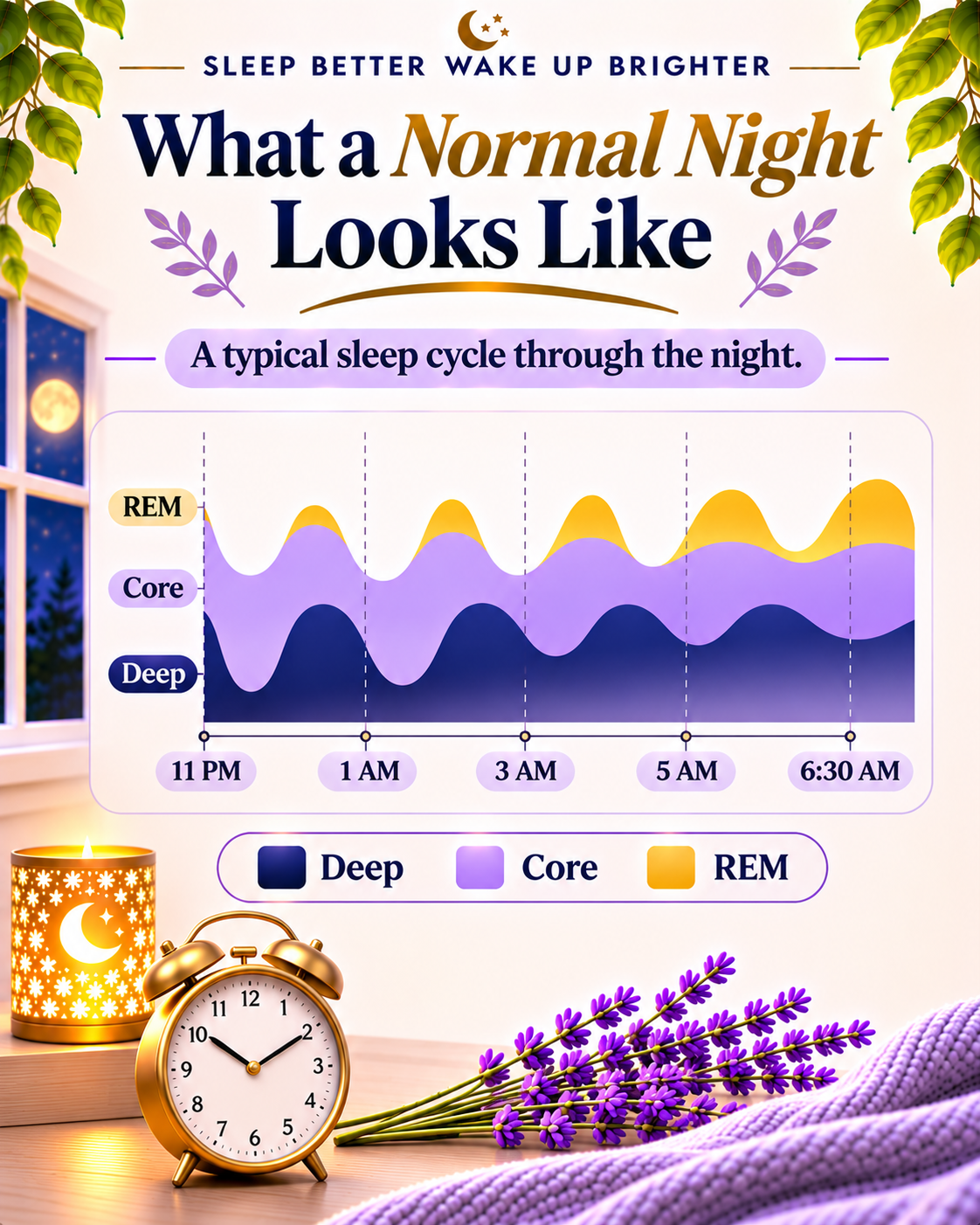
So what does a normal sleep cycle graph on Apple Watch actually look like? Let’s say you sleep for seven or eight hours a night, from 11pm to 6:30am.
The first few hours: deep dips
As soon as you’re asleep, the bars drop from Core to Deep. The longest dark blue blocks of the entire night will typically be seen in the first two or three cycles. You need deep sleep the most after you have been awake all day, so it is paid off first.
The middle of the night: mostly Core
The graph is typically calmer around 1am to 3am. A lot of Core, some Deep and some short REM. One or two small Awake marks may also be seen at the end of cycles.
The last hours before waking: longer REM
REM blocks increase in length and number as the morning approaches. The last cycle before your alarm may be mostly REM. By this time, deep sleep is usually almost entirely gone. This is normal, not an indication of any problem.
The overall shape
Put it together and a normal graph emerges: a staircase down in the first third of the night, followed by a lighter, REM rich pattern in the last third. It does not have to be neat or symmetrical. Real sleep is messy, and a perfectly tidy graph would be strange.
4. How Much Core, Deep and REM Sleep Is Normal
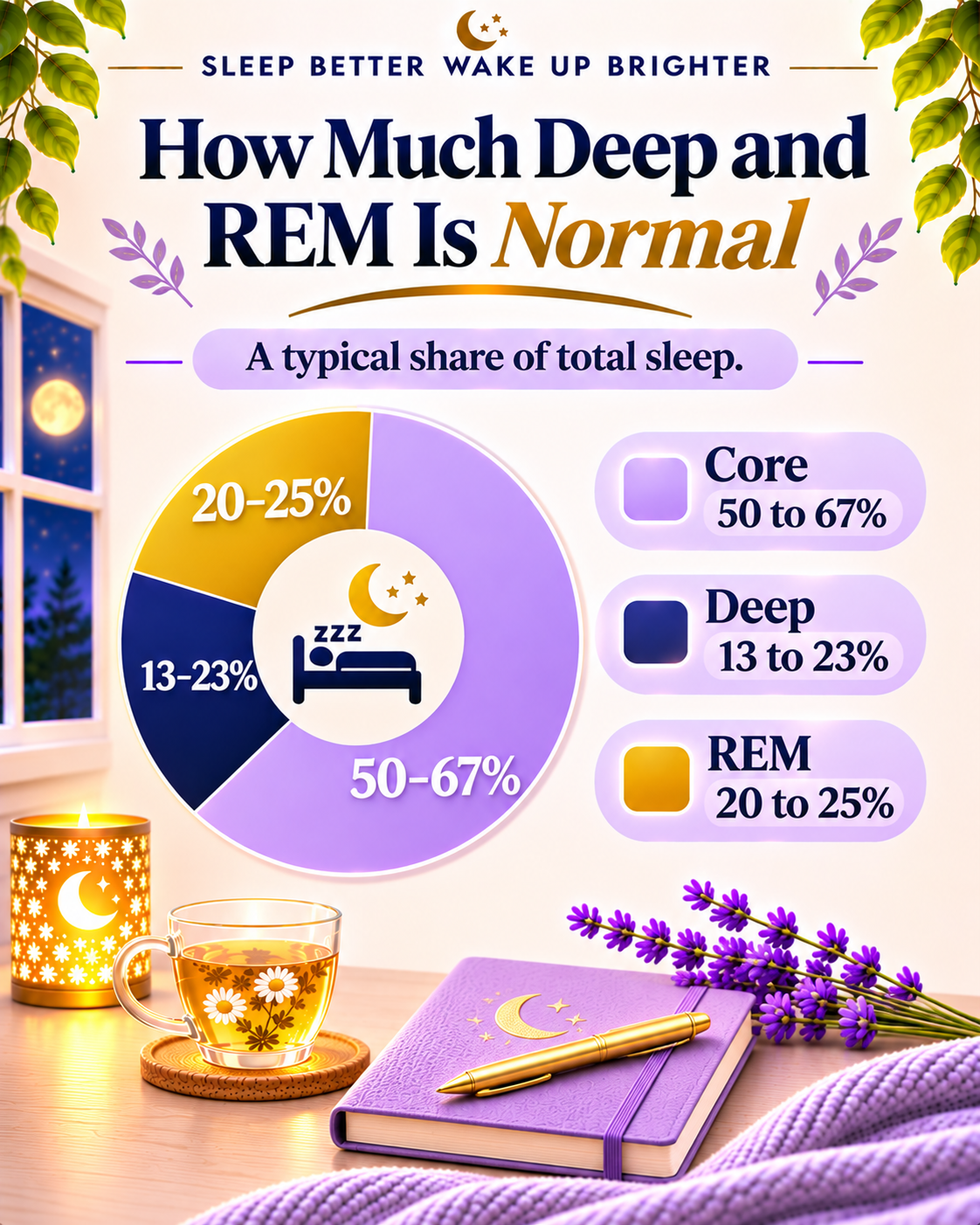
A normal sleep cycle graph on Apple Watch also shows how much time you spend in each stage. Numbers help, but remember they are ranges, not targets to hit each night. The table below combines typical ranges from sleep studies with average values observed in large groups of Apple Watch users.
Table: Normal Share of Each Sleep Stage on Apple Watch
| Stage on Apple Watch | What it covers | Typical share of the night | Rough time in an 8 hour night | Where it shows up most |
|---|---|---|---|---|
| Core | Stage 1 and Stage 2 light sleep | About 50 to 67 percent | 4 to 5 hours | All night, filling the gaps |
| Deep | Stage 3 slow wave sleep | About 13 to 23 percent | 60 to 110 minutes | First half of the night |
| REM | Dreaming sleep | About 20 to 25 percent | 90 to 120 minutes | Second half, particularly close to morning |
| Awake | Brief wake ups | A small slice | A few minutes in total | Between cycles |
Here are a few things to know about these numbers:
- According to data from Apple Watch users, the average person gets about 13 percent (or 49 minutes) of deep sleep per night. This average is partly pulled down because many people sleep less than 7 hours.
- The average for REM among watch users is about 20 percent, with most people falling between 15 and 25 percent.
- On average, about two thirds of the night is spent in core sleep. There is no “right” amount of Core, it is just what is not Deep, REM or Awake.
- As we get older, our deep sleep naturally decreases, so having less deep sleep doesn’t necessarily mean we’re sleeping badly.
5. How Long Is a Sleep Cycle, and Why Does It Vary?
Every normal sleep cycle graph on Apple Watch is built from repeating cycles. The typical sleep cycle is about 90 minutes long, though anything between 80 and 110 minutes is normal. Each one progresses from Core to Deep, back to Core and then into REM.
That’s 4 or 5 cycles on a 7 or 8 hour night. Sleep six hours and you get about four cycles. Sleep 9 and you may get to 6.
The cycles are not copies of each other, though. Early cycles have a lot of deep sleep. Later cycles have a lot of REM. That is why cutting your sleep short at the end of the night, such as waking up very early, takes away more REM than deep sleep. If your graph often shows thin REM, check first whether you are getting enough total hours.
6. Graph Patterns That Are Worth a Second Look
Not every bump on a normal sleep cycle graph on Apple Watch means something is wrong. None of these indicate an issue after one night. They matter if they appear again and again over a few weeks.
Very little deep sleep, most nights. If you’re in deep sleep less than 10 percent of the night almost every night, consider late caffeine, irregular bedtimes, stress or a room that is too warm. If you snore heavily or wake up with a headache, you may also have breathing difficulties during sleep, which can reduce deep sleep, so let your doctor know.
Very little REM, most nights. This is often linked to short sleep, an alarm that cuts off the last cycles, or some medicines. Do not change a medicine because of a graph. Ask the doctor who prescribed it.
A long gap before the first bar. If you see that you are lying awake for 30 minutes or more before you fall asleep on most nights, you may have trouble falling asleep. A quieter hour before sleep can be of great benefit.
Lots of red Awake marks all night. A few are normal. A lot of long ones suggest broken sleep from noise, light, a baby, or late tea.
Breathing Disturbances alerts. Newer watches can warn of possible sleep apnea. It’s a warning, not a diagnosis, so make a proper appointment.
7. How Accurate Is Apple Watch Sleep Tracking?
The truth: it’s a good estimate, not a medical examination.
Stages are determined in a sleep lab using sensors attached to the head which record brain waves. That is something your watch can’t do. It works from movement, heart rate and breathing, and then makes a best guess based on a model trained with lab data.
A 2025 study that compared six popular wearables with lab sleep testing found that Apple Watch agreed with the lab results better than the other devices tested. It was most accurate at Core sleep, moderately accurate at REM sleep, and least accurate at deep sleep, missing the mark about 50 percent of the time. Since then, Apple has improved its sleep staging model in watchOS 26.
What does that mean for you?
- Do not rely on the exact minutes, but on the trends. A month of gradual decline in deep sleep is significant. If it reads 38 minutes tonight and 52 minutes tomorrow, it’s mostly noise.
- Put the watch on snugly, but comfortably. If the strap is too loose, the watch can record too much movement.
8. How to Read Your Sleep Graph Without Stress
Checking your normal sleep cycle graph on Apple Watch should feel helpful, not stressful. Some people monitor their numbers so often that the monitoring itself keeps them awake. Here is a more relaxed approach to using the graph.
Check the week, not the night
Open the W view once a week, perhaps on a Friday morning. Ask three questions: Was I getting about the same number of hours most nights? Was my bedtime fairly consistent? Are there any nights that stand out, and do I know why?
Use the Sleep Score as a guide
Each morning the Health app gives you a Sleep Score from 0 to 100. Half of it is based on the amount of sleep, 30 points on the consistency of your bedtime over the last few weeks and 20 points on interruptions. So one of the easiest ways to nudge it up is a regular bedtime.
Match the graph with how you feel
If the graph is average but you are feeling fresh in the morning and don’t crash in the afternoon, you are probably OK. If the graph looks good but you feel bad all day, listen to your body and consult a doctor.
9. Small Habits That Can Make a Big Difference to Your Graph
Your habits shape your normal sleep cycle graph on Apple Watch more than you might think. You can’t directly control each stage, but you can make good sleep easier.
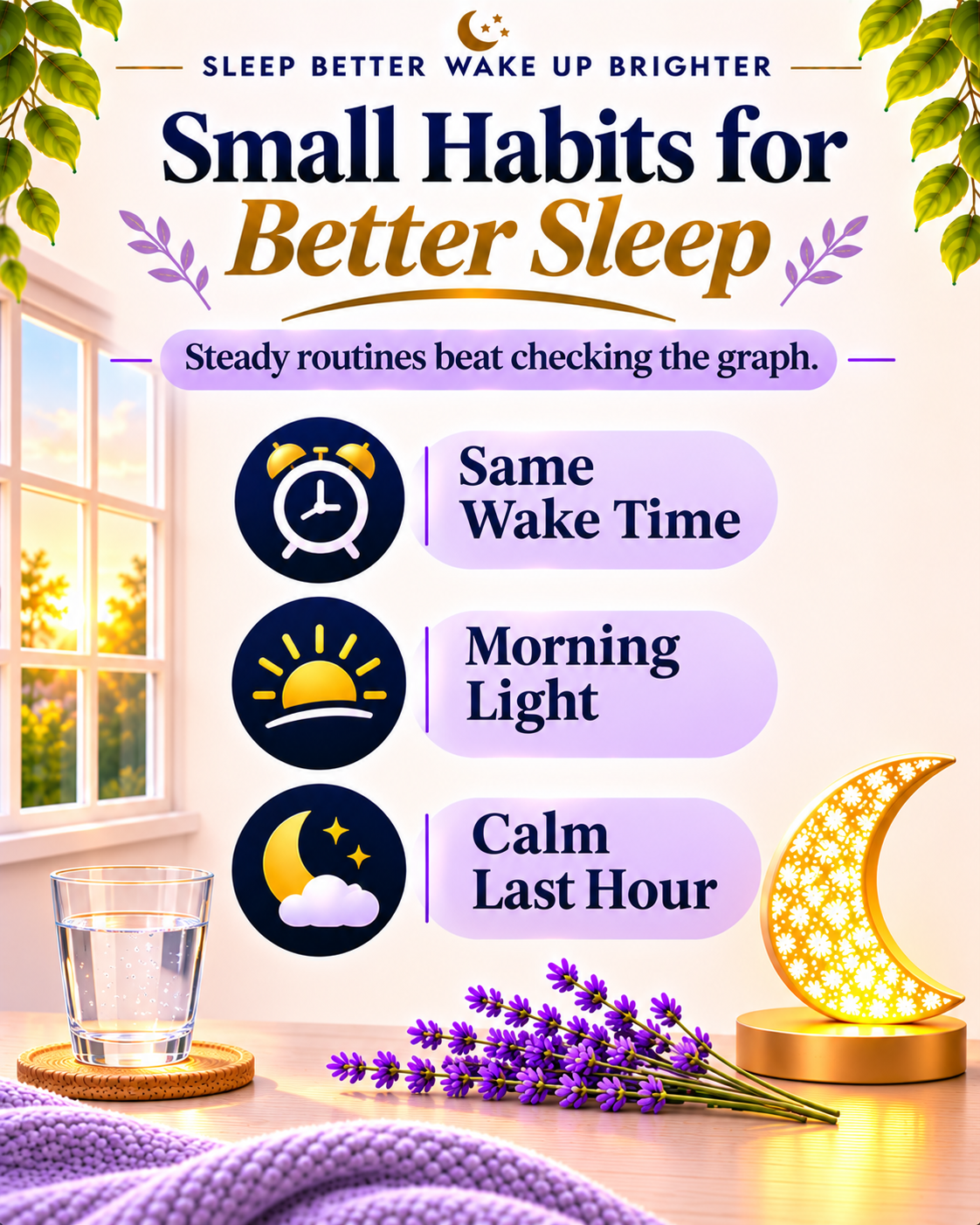
- Keep a regular wake time, weekends included. Your body clock thrives on routine and the Sleep Score rewards it.
- Get morning light. Spend 10 minutes outside after Fajr or with breakfast to let your brain know that the day has begun.
- Stop tea and coffee by mid afternoon. Late caffeine can quietly steal deep sleep.
- Move during the day and eat dinner a little earlier. Both help to make the night calmer.
- Keep the last hour calm: turn the lights down, switch on Sleep Focus and do something gentle, such as a short recitation of the Quran or light reading.
Give any change at least 2 weeks before judging it on the graph. Sleep adapts slowly.
A good graph is only half the goal. What matters most is how you feel when the alarm goes off. If your graph looks normal but your mornings still feel heavy, our guide on how to wake up refreshed shares simple steps for the night before, your time in bed and the first 30 minutes after waking.
10. FAQ
What does a normal sleep cycle graph look like on Apple Watch?
Typically 4 to 5 waves over the course of the night. Low dark blue blocks of deep sleep appear mostly in the first few hours. REM gets longer towards the morning. Core fills most of the space in between, and a few short Awake marks are normal.
How much deep sleep should I get on Apple Watch?
Most adults land around 13 to 23 percent of the night, or one to one and a half hours in an eight hour night. The average watch user gets around 49 minutes, partly because many people sleep less than 7 hours. As people get older, their deep sleep naturally decreases.
Can I trust the sleep stages on my Apple Watch?
For trends, yes. Research shows it does a fair job, particularly for Core and REM. For the exact minutes of deep sleep on one night, treat the number as an estimate.
Should I see a doctor about my sleep graph?
Talk to a doctor if poor patterns persist for weeks and you feel tired, foggy or low during the day, if someone notices that you stop breathing at night, or if your watch alerts you to breathing disturbances.
11. Summary
The normal sleep cycle graph on Apple Watch isn’t a neat, tidy shape. It’s a set of four or five waves, with deep sleep clustered early in the night, REM increasing towards the morning, lots of Core in between, and some brief wake ups throughout. Use the weekly view to identify real patterns, ignore single nights and always compare the chart with how you actually feel. Small, consistent routines such as a regular wake time, sunlight first thing in the morning, an earlier time to stop drinking caffeine and a quiet hour before bed will have a greater impact on that graph than all of the checking.
This article is not intended to be medical advice. If sleep is a concern, please consult a qualified doctor.

Post Comment